

License activation (Mac)
The Paddle Mac SDK has a flexible licensing implementation that allows you to use our full solution, just our platform for issuing and validation, or roll your own entirely.
Access Dialog
Section titled “Access Dialog”The SDK provides a standard access dialog, which can be invoked whenever the app is found in an unlicensed state:
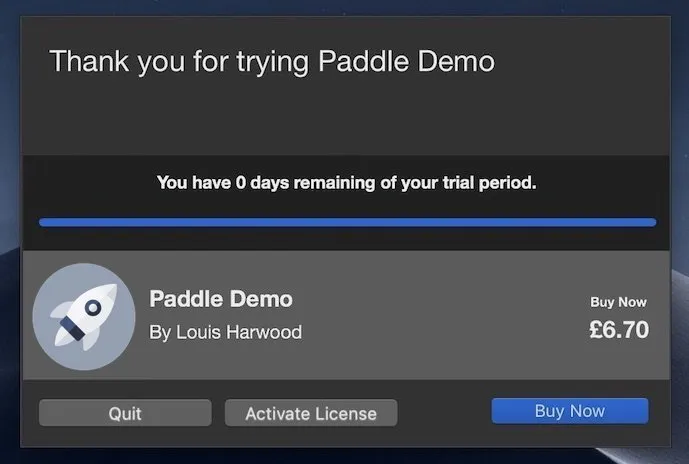
The product access dialog is triggered by calling the showProductAccessDialogWithProduct method. See example below:
// Create the Product we want to work withPADProduct *paddleProduct = [[PADProduct alloc] initWithProductID:@"12345"                                                      productType:PADProductTypeSDKProduct                                                    configuration:nil];
// Refresh to ensure we've got up to date information locally for the product// Remote values will supersede local[paddleProduct refresh:^(NSDictionary * _Nullable productDelta, NSError * _Nullable error) {    [paddle showProductAccessDialogWithProduct:paddleProduct];}];
// Create the Product we want to work withlet paddleProduct = PADProduct(productID: myPaddleProductID, productType: PADProductType.sdkProduct, configuration: nil)
// Refresh to ensure we've got up to date information locally for the product// Remote values will supersede localpaddleProduct?.refresh({ (delta: [AnyHashable : Any]?, error: Error?) in paddle?.showProductAccessDialog(with: paddleProduct!)})Activation Dialog
Section titled “Activation Dialog”If you want to direct your users straight to the license activation dialogue instead, you can do so by calling the activation Dialog:
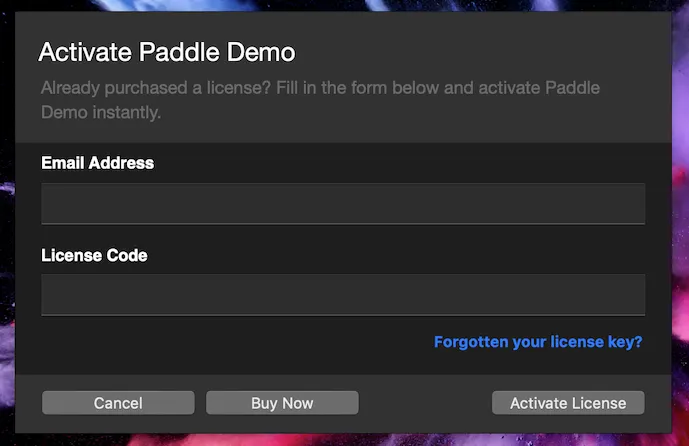
The activation dialog is triggered by calling the showLicenseActivationDialogForProduct method. See example below:
// Create the Product we want to work withPADProduct *paddleProduct = [[PADProduct alloc] initWithProductID:@"12345"                                                      productType:PADProductTypeSDKProduct                                                    configuration:nil];
// Refresh to ensure we've got up to date information locally for the product// Remote values will supersede local[paddleProduct refresh:^(NSDictionary * _Nullable productDelta, NSError * _Nullable error) {    [paddle showLicenseActivationDialogForProduct:paddleProduct email:NULL licenseCode: NULL                              activationStatusCompletion:^ (PADActivationState activationState){
           }];
}];
// Create the Product we want to work withlet paddleProduct = PADProduct(productID: myPaddleProductID, productType: PADProductType.sdkProduct, configuration: nil)
// Refresh to ensure we've got up to date information locally for the product// Remote values will supersede localpaddleProduct?.refresh({ (delta: [AnyHashable : Any]?, error: Error?) in paddle?.showLicenseActivationDialog(for: paddleProduct, email: nill, licenseCode:nill, activationStatusCompletion:{ (activationState: PADActivationState) in })})Programmatic (“Silent”) Activation
Section titled “Programmatic (“Silent”) Activation”If you’re making use of our licensing but want to use your own UI, you can make the activation call manually and handle the result as follows:
[paddleProduct activateEmail:@"example@email.com" license:@"ABCD-EFGH-IJKL-MNOP" completion:^(BOOL activated, NSError * _Nullable error) { // Handle the activation result}];paddleProduct?.activateEmail("example@email.com", license: "ABCD-EFGH-IJKL-MNOP", completion: { (activated: Bool, error: Error?) in // Handle the activation result})License Custom Path (Mac)
Section titled “License Custom Path (Mac)”License custom path allows you to choose where you want the license to be stored.
customStoragePath is a delegate method that has been introduced in v4.0.13 that allows you to choose where the user license should be stored. E.g., if you would like the license to be accessible for all users on a certain machine you would store the license at /Users/Shared.
Set delegate to self :
// Initialize the SDK Instance with Seller details:Paddle *paddle = [Paddle sharedInstanceWithVendorID:myPaddleVendorID apiKey:myPaddleAPIKey productID:myPaddleProductID configuration:defaultProductConfig delegate:self];}];let paddle = Paddle.sharedInstance(withVendorID: myPaddleVendorID, apiKey: myPaddleAPIKey, productID: myPaddleProductID, configuration: defaultProductConfig, delegate: self)Add the customStoragePath delegate method:
- (NSString *)customStoragePath { return @"/Users/shared"; //Needs to be full path to custom storage directory}func customStoragePath() -> String { return "/Users/Shared"}License usage
Section titled “License usage”When activating a product you can optionally use an alternative method, which provides further details in the completion block. These details include the usage values of the license being activated.
allowed_usestotal number of allowed activationstimes_usednumber of times the license has been activated
Note: This method has been introduced in v4.3
[product activateDetailsWithEmail:@"" license:@"" completion:^(BOOL activated, NSError * _Nullable error, NSDictionary * _Nullable activationData) {
            //allowed_uses and times_used are available on activationData
            NSLog(@"%@", activationData[@"allowed_uses"]);
            NSLog(@"%@", activationData[@"times_used"]);
        }];